
24 copy-paste prompts that make AI articles read like a person wrote them.
Six for each content type, written to layer on top of the plugin’s built-in prompt without touching the structure it depends on. Copy one, paste it into a Prompt Preset, and every article you generate from then on carries a different voice.
The short version
- The plugin already rotates 5 built-in writing styles per content type. Your presets stack on top of that, not instead of it.
- Save up to 15 prompts per type, tick Enable rotation, and one is picked at random on every generation.
- Write about voice, angle and evidence. Never about headings, HTML or output format. That one rule is what keeps product boxes landing on the right products.
- Everything below is copy-paste ready and follows that rule.
Bulk-written affiliate content fails for one reason more than any other: fifty articles that all open the same way, use the same section names and reach for the same six adjectives. Search engines notice the pattern. So do readers.
Prompt presets are the fix. They are short instructions you save once, and the plugin shuffles them across generations so no two articles are built from the same brief. This page is a library of prompts that work — plus the rules for writing your own without breaking anything.
Where this lives. Presets sit at the top of AI Content Writer, in the panel headed Prompt Presets (Random Rotation). If you have not set up an AI provider and model yet, start with the AI Settings guide — nothing here can run without a key.
How the prompt is actually built
Understanding this is what separates a preset that improves your writing from one that quietly wrecks it. Every generation assembles a prompt from four layers, in this order.
Layer 2 already does more than most people realise. Five styles per type, chosen at random, means an untouched install never writes two identical articles. Your presets multiply that: 5 built-in styles × 15 of your prompts = 75 combinations per content type.
The one rule: write about voice, not structure
Layer 1 does more than write text. In a Top 5 roundup it counts <h2> headings and injects a product box before each one. Add a heading, remove a heading, or ask for a heading above the spec table, and every box shifts onto the wrong product.
This is the single way to break a generated article. A preset that says “add a Pros and Cons heading to each product” in a Top 5 will push five product boxes one section out of place. The same instruction in a single review is harmless. When in doubt, describe how to write, never what to put where.
✓ Safe to ask for
- Voice, person and tense
- The angle the article argues from
- What kind of evidence to lean on
- Sentence and paragraph rhythm
- Words and habits to avoid
- How opinionated to be
- Who the reader is
✗ Never ask for
- Extra or fewer
<h2>headings - A heading before the comparison table
- A different output format or “plain text”
- Removal of the product data section
- Markdown, code fences, or an H1
- Double quotes inside HTML attributes
- Prices, star ratings or review counts
Why the right-hand column is not a limitation. Structure is what makes affiliate content convert — the box in the right place, the table before the picks, the FAQ at the end. Voice is what makes it readable. The preset system splits them so you can change one without risking the other.
Where the prompts go

Each content type keeps its own list. A prompt saved under Top 5 Roundup never appears in a single review, so you can tune each type separately.
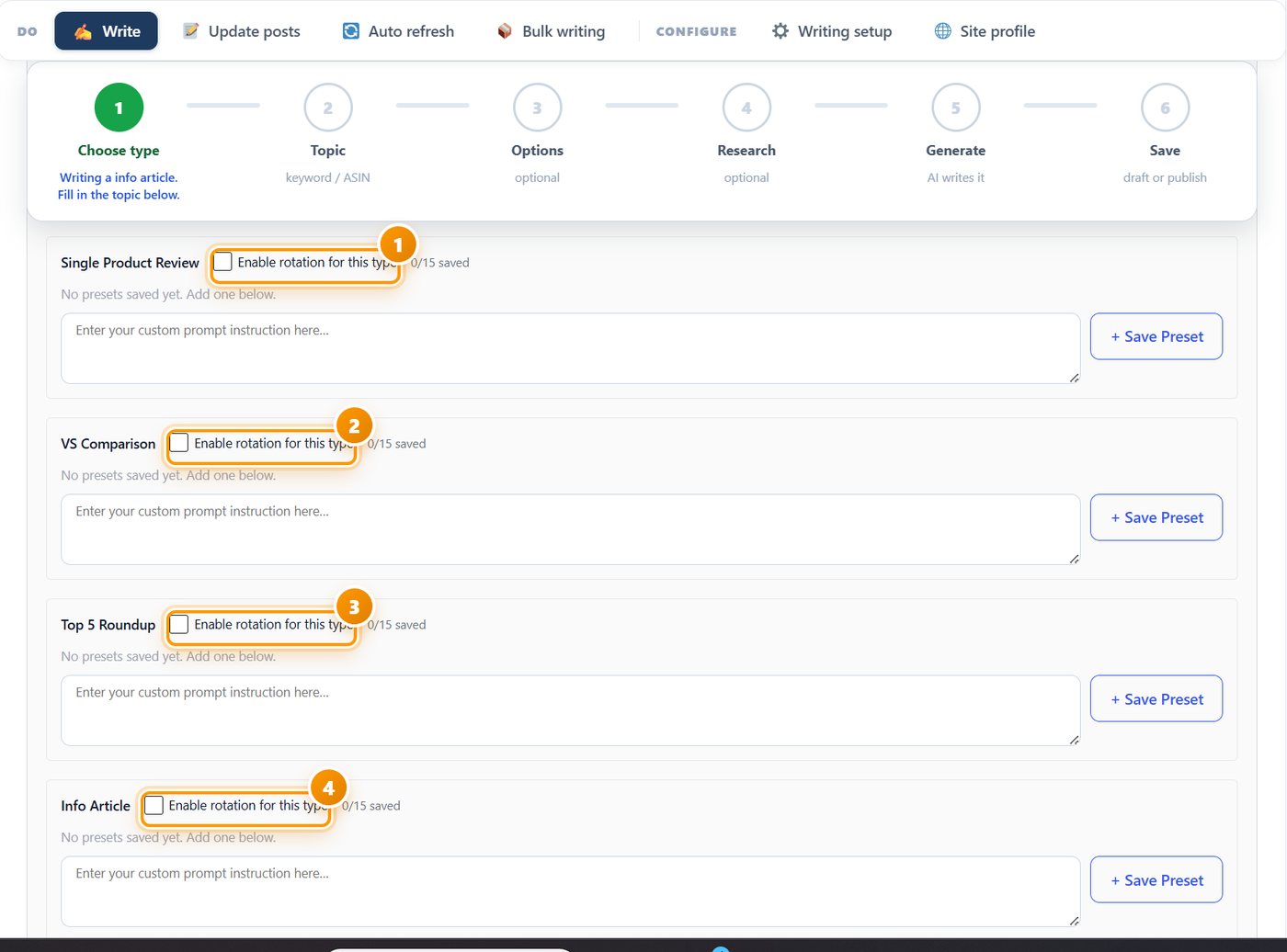
Two things worth knowing before you start
| Behaviour | What it means for you |
|---|---|
| A manual prompt beats rotation | If you type something into the custom prompt box on the writing form itself, the rotation is skipped for that article. Rotation only fires when that box is empty — which is exactly what you want for bulk runs. |
| Presets are added, never substituted | Your text is appended to the base prompt. It cannot delete the product data, the heading plan or the output format, no matter what it says. That is a safety net, not a licence to fight it — a preset that argues with layer 1 produces confused writing. |
Test with a single post first. Save one preset, leave rotation off, generate one article and read it properly. Only when you like the result should you tick Enable rotation and let it loose on a bulk run.
The prompt library
Twenty-four prompts, six per content type. Each one produces a genuinely different article — not the same piece with different adjectives. Copy any of them straight into a preset box.
They are written to a deliberate spec: every one is about voice, evidence and rhythm; none mentions a heading, a tag or an output format; and none asks for anything the compliance layer would strip out anyway.
Single Product Review — 6 prompts
VS Comparison — 6 prompts
Top 5 Roundup — 6 prompts
These are the prompts to be most careful with. Every one below talks only about how each pick is written — never about how many there are, what order they come in, or what sits between them. Keep that discipline in any prompt you write yourself for this type.
Info Article — 6 prompts
How to write your own prompts
Twenty-four prompts will carry you a long way, but your niche has angles nobody else can write for you. Here is how to produce your own without guessing.
The four-part shape that works
Almost every good preset does the same four things. Write one line for each and you have a working prompt.
| Part | What it answers | Example line |
|---|---|---|
| 1. Who is writing | The perspective and the authority behind it. | “Write as someone who fits these for a living.” |
| 2. What the article argues | The angle that makes it different from every other post on the keyword. | “Build everything around what fails first.” |
| 3. What counts as evidence | Where specifics must come from, so the model stops reaching for adjectives. | “Every claim traceable to the supplied data.” |
| 4. One rhythm instruction | The habit that stops the output sounding generated. | “Vary sentence length hard. No two sections open the same way.” |
Keep it to 40–80 words. Short prompts steer; long prompts argue with the base prompt and dilute it. Every prompt in the library above is inside that range, and that is not an accident.
Using an AI tool to generate your prompts
Any chat assistant will write presets for you if you brief it properly. The meta-prompt below has produced usable results across every tool we have tried it in. Paste it, answer the questions it asks, and it will hand back prompts in the right shape.
Which tool to use
| Tool | Cost | Good for |
|---|---|---|
| Google Gemini | Free tier | Bulk-generating first drafts of prompts. The free tier is generous enough to iterate all evening. |
| ChatGPT | Free tier / paid | Refining a prompt you already half-like. Good at spotting when two of your prompts overlap. |
| Claude | Free tier / paid | The most reliable at holding a constraint list — useful because the “never mention structure” rule is the one tools break most. |
| DeepSeek | Very low cost | Cheap enough to generate fifty variants and keep five. The same reason it is the best value for the writing itself. |
| The plugin itself | Your existing key | The only real test. A prompt is good or bad based on the article it produces here, not on how it reads in a chat window. |
Mining your own analytics for angles
The best prompts come from something you already know. Before opening a chat tool, look at three things:
- Search Console queries for pages that rank on page two. The questions people actually type are ready-made article angles.
- Your own returns and complaints, if you sell anything. Regret is the most under-used angle in affiliate writing.
- The top three results for your keyword. Write down the angle each one takes, then write a prompt that takes the fourth. Sounding different is worth more than sounding better.
Check a prompt before you trust it
Run any new preset — yours or one from above — through this before enabling rotation.
- It says nothing about headings, sections, HTML, formatting or output.
- It is between 40 and 80 words.
- It names a perspective, an angle, an evidence rule and a rhythm habit.
- It could not be confused with any other preset in the same list.
- You generated one article with it and read the whole thing.
- In that article, every product box sits under the right product.
- The article does not open the same way as one written without the preset.
The last check is the real one. If a preset produces an article you cannot tell apart from the default, it is not adding anything — and it is taking a rotation slot from a prompt that would.
If a preset misbehaves
| What you see | What it usually means | What to do |
|---|---|---|
| Product boxes under the wrong products in a Top 5 | The prompt asked for an extra heading | Delete any sentence mentioning sections, headings or “add a part for”. Regenerate. |
| The article ignored your preset entirely | Something was typed in the manual custom prompt box | A manual prompt overrides rotation. Clear that box for bulk runs. |
| Rotation is on but every article reads the same | Only one preset saved, or the prompts are too similar | Save at least three genuinely different prompts per type. Variety comes from contrast, not quantity. |
| Generation fails or returns nothing | The prompt asked for a different output format | Remove anything about JSON, markdown, plain text or code blocks. The output format is not negotiable. |
| The writing got vaguer, not better | The prompt is too long | Cut to under 80 words. Keep the perspective and the angle; drop the rest. |
| Prices or ratings appear | Nothing — they cannot | The compliance layer strips these regardless of what a preset says. If you see one, it came from the product title itself. |
| You cannot add another preset | Fifteen already saved for that type | Delete your weakest. Fifteen well-chosen prompts already give 75 combinations with the built-in styles. |
Frequently asked questions
Do I need presets at all?
No. Five built-in writing styles per content type already rotate on every generation, so an untouched install never writes two identical articles. Presets are for when you want a voice specific to your niche rather than a good generic one.
How many prompts should I save per type?
Three is enough to break the pattern. Six is comfortable. Fifteen is the maximum and rarely necessary — with five built-in styles, even six of your own gives thirty combinations per type.
Can a preset break a generated article?
Only in one way: by changing the heading structure. Product boxes are placed by counting headings, so a prompt that adds or removes one shifts every box. Keep prompts to voice, angle, evidence and rhythm and nothing can go wrong.
Why can’t I ask for a different output format?
The plugin reads the generated article as structured data with four fields, then builds the post from it. Asking for markdown or plain text breaks that read and the generation fails. Formatting is layer 1’s job and it is not yours to change.
Will these prompts make my content pass AI detection?
They help, and so does the built-in rule set that bans the phrases and sentence shapes detectors look for. But no prompt guarantees a detector score. What these actually buy you is content a reader stays on — which is the thing that pays.
Can I use the same prompt for two content types?
You can paste it into both lists, but the types want different things. A comparison prompt that says “reach a verdict in the second paragraph” makes no sense in an info article. The library above is split by type for that reason.
Does a preset change my API cost?
Barely. A 60-word instruction is a rounding error next to the product data and the article itself. You can watch the real figures under AI Settings once your token prices are saved.
Is the preset panel the same in Ama Affiliate Ultra?
Yes. Same panel, same four types, same fifteen-per-type limit. Ultra’s AI Agent uses the same presets when it writes.
Fifty articles, fifty voices
Five built-in styles, fifteen of your own prompts per type, shuffled on every generation. The AI runs on your own API key — no credits, no word limits. Every plan includes every feature and a 14-day free trial.
See plans & start free